top of page

Wix Bookings

Wix Bookings: About the "My Wallet" Page

The My Wallet feature allows clients to securely save credit card information so they can complete future transactions without re-entering their details.

How does it work?

When a logged-in client goes to pay for a service, they see their personal details (name, email address, etc.) already filled in. If a client is not logged in, they are prompted to log in or to create an account and then log in.

A screenshot of clients are prompted to log in.

Next, when the client enters their credit card details for the first time, they can choose whether they want to save those details.

A screenshot where clients can save their credit cards for next time.

What happens when a client with a saved card books?

When a client who saved a card returns, they can select their saved card as a payment option or choose Credit / Debit Card to enter a new card.
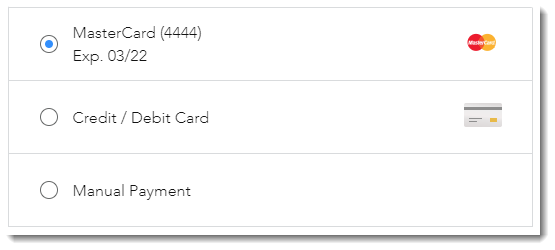
A screenshot of saved credit cards.

Where can clients view and make changes to saved cards?

The My Wallet page is the place to manage saved credit cards.

A screenshot of My Wallet in a clients account.

In the My Wallet page, clients can:

  • View saved credit cards

  • Remove saved credit cards

  • Set a card as default

Clients can access their My Wallet page by logging in and selecting it from their personal drop-down menu.

A screenshot where clients can find their My Wallet page.

Important:

  • The My Wallet page is private. Each client sees only their own information.

  • Saving Credit Card details is not supported by Square, 2CheckOut, Payu, and CitrusPay. Click here to vote for this feature.

Need A Professional Website?
Contact Us 
Today!

Wix Stores: Setting Up Affiliate Marketing with the Goaffpro App

Wix Contacts: About Your Contact Panel

Wix Contacts: Using Pinned Actions in Your Contact Panel

Wix Contacts: Creating a Test Contact

Wix Contacts: Changing a Contact's Subscription Status

Wix Contacts: Adding and Managing Custom Contact Fields

Wix Contacts: Creating and Using Contact Labels

Wix Contacts: Creating a Segment

Wix Contacts: About Segments

Wix Contacts: Exporting Your Contacts

Wix Contacts: Troubleshooting Contact Importing Issues

Wix Contacts: Importing Contacts by Uploading a CSV File

Wix Contacts: Importing Contacts from a Gmail Account

Wix Contacts: Managing Your Contact List

Wix Contacts: Manually Adding a Contact

Wix Contacts: An Overview

Wix Forms: Creating a Coupon

Wix Forms: Setting Up Tax on Your Form

Wix Forms: The Difference between the New and Old Wix Forms

Wix Forms: Viewing Form Submissions from Your Dynamic Pages

Wix Forms: Managing Your Forms from the Dashboard

Wix Forms: Choosing an Address Field

Wix Forms: Adding and Setting Up a Donation Form

Wix Forms: Adding Submission Limits to Your Forms

Wix Forms: Adding and Managing Rules

Wix Forms: Upgrading Wix Forms

Wix Forms: Adding and Setting Up a Multi-Step Form

Wix Forms: Adding Payments to a Site Form

Wix Forms: Enabling Double Opt-In for Subscribers

Wix Forms: Adding and Setting Up a Subscribe Form

wix experts
Graphic2Traffic web design
©
bottom of page